JavaScript Control Flow Explained (if, if-else, else-if, switch)

Every program makes decisions.
Just like humans decide things in real life:
If it is raining → take an umbrella
If marks are above 90 → give a reward
If traffic light is red → stop
Programming languages follow the same idea using something called control flow.
What is Control Flow?
Control flow decides which part of the program runs and when.
Instead of executing every line sequentially, programs sometimes need to:
make decisions
choose different paths
execute code based on conditions
Example:
let age = 18;

if (age >= 18) {
  console.log("You can vote");
}
Here the program checks a condition and decides whether to run the code.
The if Statement
The if statement runs a block of code only if the condition is true.
Syntax
if (condition) {
  // code to run if condition is true
}
Example
let marks = 80;

if (marks > 50) {
  console.log("You passed the exam");
}
How it works step by step
Program checks
marks > 50Condition evaluates to true
Code inside
{}executes
If the condition were false, the code would simply be skipped.
The if-else Statement
Sometimes we want two possible outcomes.
Example:
If age ≥ 18 → allow voting
Else → not allowed
Syntax
if (condition) {
  // runs if true
} else {
  // runs if false
}
Example
let age = 16;

if (age >= 18) {
  console.log("You can vote");
} else {
  console.log("You cannot vote yet");
}
Program Flow
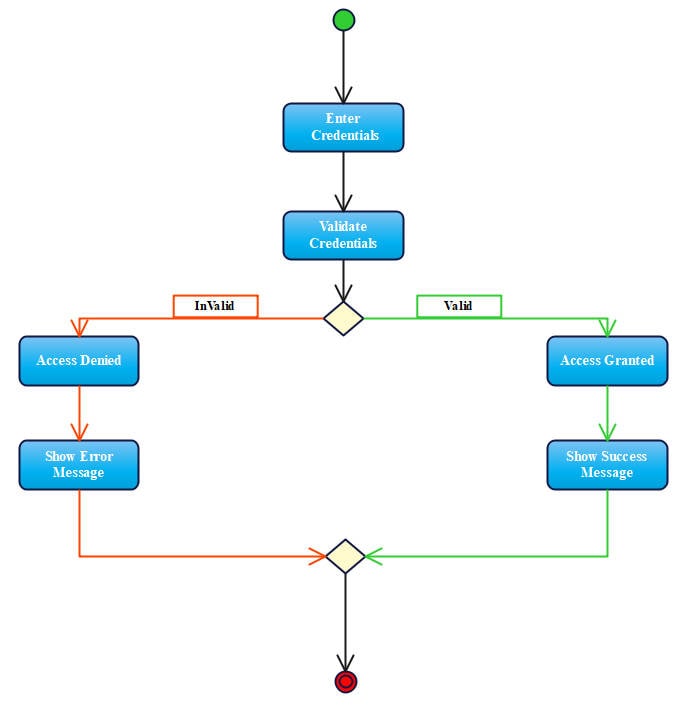

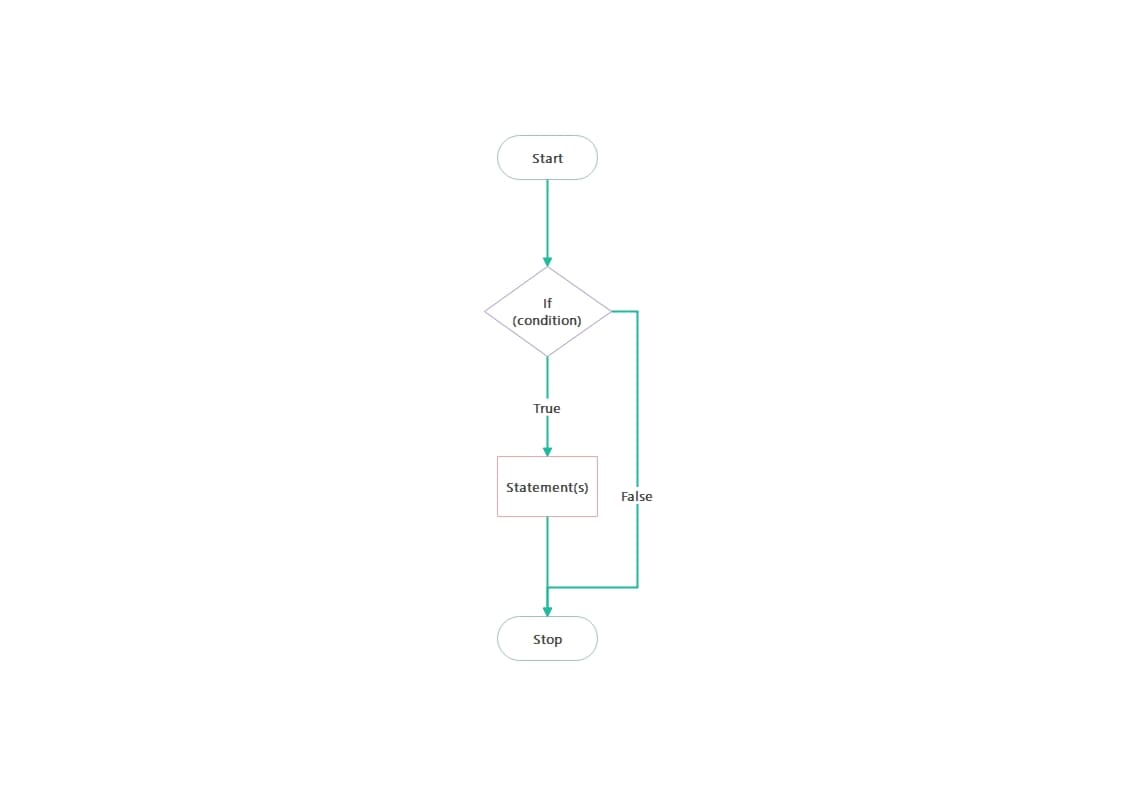
Step-by-step:
Check condition
If true → run IF block
If false → run ELSE block
The else if Ladder
Sometimes there are more than two possibilities.
Example grading system:
Marks ≥ 90 → Grade A
Marks ≥ 70 → Grade B
Marks ≥ 50 → Grade C
Otherwise → Fail
Syntax
if (condition1) {

} else if (condition2) {

} else if (condition3) {

} else {

}
Example
let marks = 75;

if (marks >= 90) {
  console.log("Grade A");
} else if (marks >= 70) {
  console.log("Grade B");
} else if (marks >= 50) {
  console.log("Grade C");
} else {
  console.log("Fail");
}
How it works
The program checks conditions from top to bottom.
As soon as it finds true, it stops checking further conditions.
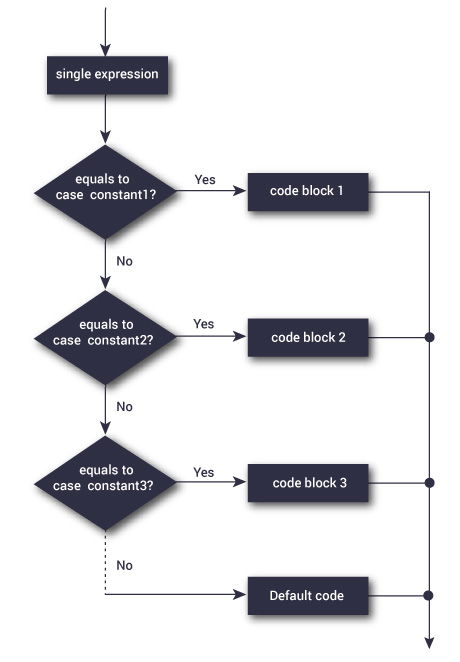
The switch Statement
When a variable can have many exact values, using switch can make code cleaner.
Example: printing the day of the week.
Syntax
switch (expression) {
  case value1:
    // code
    break;

  case value2:
    // code
    break;

  default:
    // default code
}
Example
let day = 3;

switch (day) {
  case 1:
    console.log("Monday");
    break;

  case 2:
    console.log("Tuesday");
    break;

  case 3:
    console.log("Wednesday");
    break;

  default:
    console.log("Invalid day");
}
Why break is Important
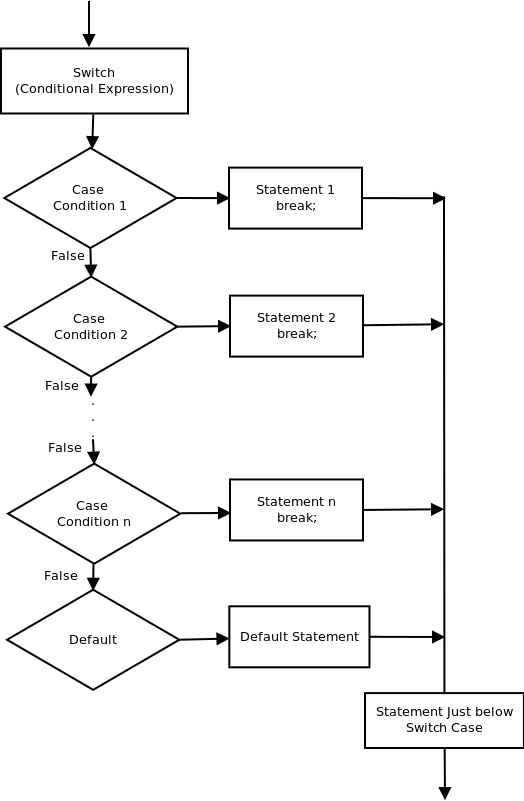
Without break, JavaScript continues executing the next cases.
Example without break:
case 1:
console.log("Monday");

case 2:
console.log("Tuesday");
Output:
Monday
Tuesday
Even though the value was 1.
break stops execution and exits the switch.
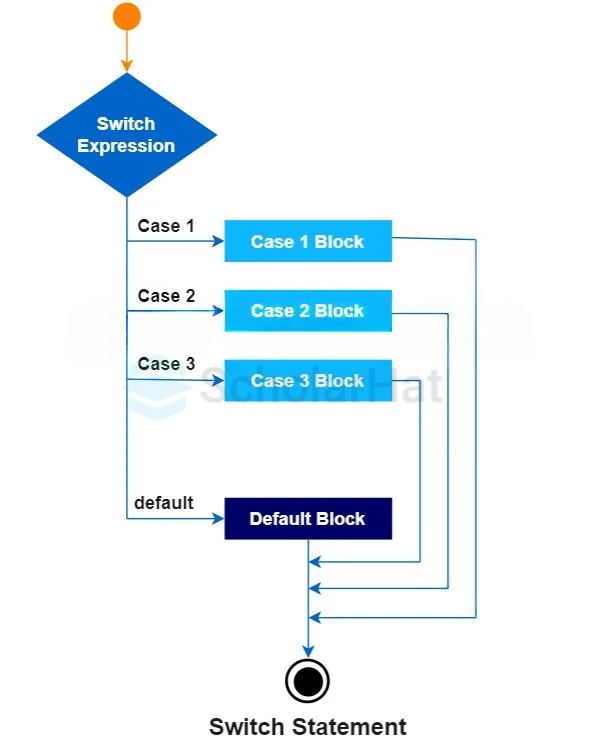
Switch Case Flow Diagram
When to Use switch vs if-else
Use if-else when:
Conditions involve ranges
Conditions involve comparisons
Example:
if (marks > 90)
Use switch when:
Comparing exact values
Many possible values of one variable
Example:
switch(day)
Example comparison
if-else:
if(day === 1)
switch:
case 1:
Practice Assignment
1) Check if Number is Positive, Negative, or Zero
Write a program that checks whether a number is:
Positive
Negative
Zero
Example:
let num = -5;

if (num > 0) {
  console.log("Positive");
} else if (num < 0) {
  console.log("Negative");
} else {
  console.log("Zero");
}
Explain:
Which control structure did you use?
Why did you choose it?
Print Day of Week Using Switch
Write a program that prints the day based on a number.
Example:
1 → Monday
2 → Tuesday
3 → Wednesday
Example code:
let day = 2;

switch(day){
  case 1:
    console.log("Monday");
    break;

  case 2:
    console.log("Tuesday");
    break;

  default:
    console.log("Invalid day");
}
Explain why switch is suitable here.